Guides
NN76 Update Guide v1.1.0
NN76 Update Guide v1.1.0
Guide for updating NN76 from version 1.0.5 to version 1.1.0.
Before You Update
Backup your projects first! Old projects will open fine in v1.1.0, but once you save them with the new version, they won't open in v1.0.5 anymore.
While we've thoroughly tested v1.1.0 and taken every care to ensure compatibility, having a backup means you can safely return to v1.0.5 if you encounter any unexpected issues.
Ready to Update?
What's New
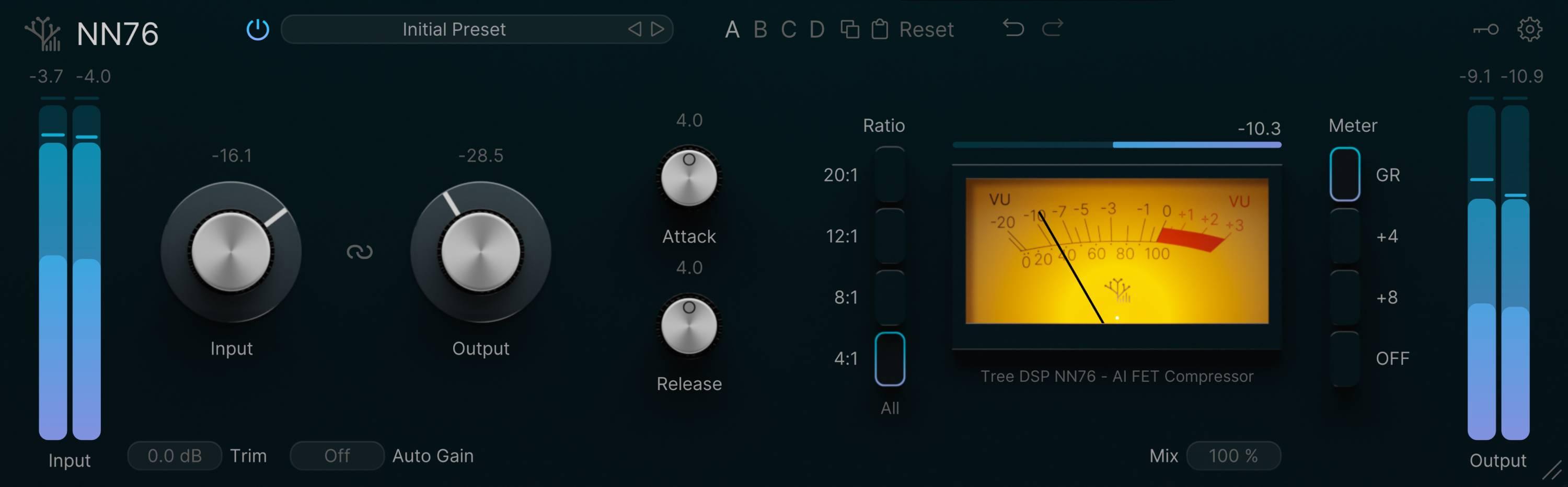
- All-Buttons-In Mode - The classic "British mode" compression
- 4 Preset Banks (A, B, C, D) - Quickly switch between different settings
- Auto-Gain - Automatically matches output to input level
- Input Trim - Extra gain control before the compressor
- Undo/Redo - Easily step through changes
- Tooltips - Helpful hints when you hover over controls
- Various bug fixes and stability improvements
Important: You'll Need to Activate Again
Why am I seeing this?
Version 1.1.0 uses improved licensing, so you'll need to activate your device one more time after updating.
After you activate v1.1.0, you'll see two activations for the same computer in your account (one old, one new). This uses 2 of your 3 activation slots.
To free up a slot, remove the old activation:
- Go to your account page
- Click the Products tab
- Find the older activation (it will have an earlier date)
- Click Deactivate
How to Update
- Backup your projects that use NN76
- Download v1.1.0 from your account page
- Run the installer - it will replace v1.0.5
- Open NN76 in your DAW and click Activate when prompted
- Your browser will open - log in and authorize the device
- (Optional) Remove the old activation from your account to free up a slot
Having Issues?
Plugin won't activate:
- Check your internet connection
- Try deactivating an old device in your account
- Contact us if still stuck
Plugin not showing up:
- Rescan plugins in your DAW
- Restart your DAW
Need more help? Visit our support page or contact us.